Capturing perfectly smooth and stable video can be the difference between amateur-looking content and a professional masterpiece. In today’s dynamic world of filmmaking and content creation, camera shake is the enemy, and two primary technologies stand ready to combat it: mechanical gimbals and electronic image stabilization (EIS). Both aim to deliver a seamless viewing experience, yet they achieve this through fundamentally different approaches, each with its own set of advantages and limitations. Understanding these distinctions is crucial for photographers and videographers aiming to elevate their craft, whether you’re shooting with a high-end cinema camera or just your smartphone. This comprehensive guide will break down the intricacies of each stabilization method, helping you decide which technology is the better fit for your creative journey and technical requirements.
Understanding the Fundamentals
To truly appreciate the strengths and weaknesses of each system, it’s essential to grasp how mechanical gimbals and electronic stabilization operate at their core. These methods represent a divergence in engineering philosophy: one relies on physical precision, while the other leverages digital intelligence.
What is a Mechanical Gimbal?
A mechanical gimbal is an external device that uses a series of motorized axes and sophisticated sensors to physically keep your camera level and steady, regardless of the operator’s movement. These devices typically feature three axes—pitch (tilt), yaw (pan), and roll—allowing for intricate control over the camera’s orientation. By detecting unwanted movements in real-time, the gimbal’s motors actively counteract these forces, resulting in incredibly fluid and professional-looking shots. Gimbals are often seen as the gold standard for achieving cinematic motion, especially with heavier camera setups where precise control is paramount.
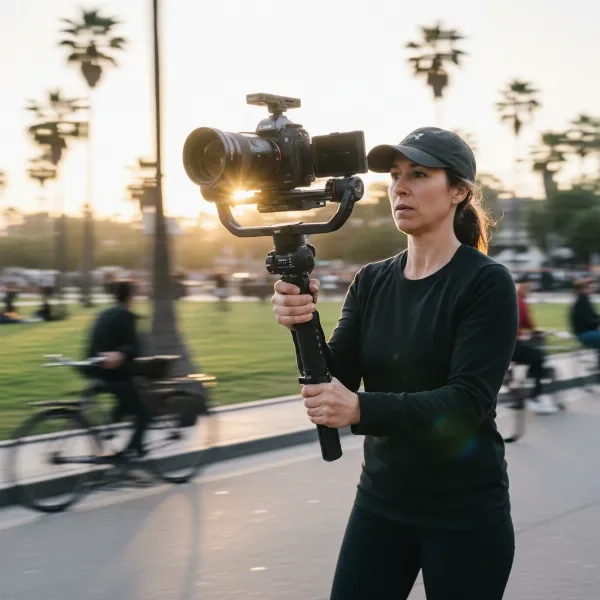 Professional camera on a 3-axis mechanical gimbal capturing smooth, stable video footage.
What is Electronic Image Stabilization (EIS)?
Electronic Image Stabilization (EIS), on the other hand, is a software-based solution integrated directly into your camera or smartphone. Instead of physical movement, EIS relies on the device’s image sensor and advanced algorithms to analyze incoming video frames. When camera shake is detected, the system digitally crops the edges of the frame and shifts the active image area to compensate for the movement, creating the illusion of stability. This process happens either in real-time during recording or can be applied in post-processing. EIS is a popular feature in action cameras, drones, and smartphones due to its compact nature and convenience.
Key Differences: A Direct Comparison
The choice between a mechanical gimbal and electronic stabilization often comes down to a careful evaluation of several critical factors. Each technology excels in different areas, making them suitable for distinct shooting scenarios and user preferences.
Stabilization Mechanism
The fundamental distinction lies in their approach. Mechanical gimbals employ a physical stabilization method, using motors to adjust the camera’s position on multiple axes. This real-time counteraction provides a high degree of precision, capable of smoothing out significant shakes and vibrations. EIS, conversely, uses a digital approach. It crops the image and shifts the frame to simulate stability, relying entirely on software algorithms. While effective for minor jitters, it may struggle with more abrupt or pronounced camera movements.
Effectiveness & Smoothness
When it comes to raw stabilization power, mechanical gimbals generally offer superior results. Their multi-axis motor control provides an unparalleled level of smoothness, making them ideal for professional videography where cinematic precision is a must. Gimbals can handle walking, running, and even complex tracking shots with remarkable fluidity. EIS, while effective for handheld shots and moderate movement, might produce less consistent results, particularly with aggressive motion or in low-light conditions where the system has less data to work with.
Image Quality Impact
Mechanical gimbals preserve the original image quality because they stabilize the camera physically without altering the captured footage itself. You get the full sensor resolution and field of view. EIS, however, often comes with a trade-off. To digitally shift and correct the image, it typically crops the frame slightly. This means a minor loss of field of view and, in some cases, a slight reduction in overall image resolution or the introduction of a “jello” effect with very fast movements.
Power Consumption & Battery Life
Battery life is a significant consideration, especially for extended shoots. Mechanical gimbals, being motorized devices, consume more power. The continuous operation of their motors and sensors can lead to a faster depletion of battery life for both the gimbal itself and potentially the attached camera if powered via the gimbal. EIS is a more power-efficient solution as it primarily relies on the camera’s existing processing power rather than additional physical components requiring constant energy. This makes EIS a favorable choice for longer shooting sessions without the need for frequent battery changes or external power.
Portability & Convenience
For those who prioritize mobility and a lightweight setup, EIS holds a clear advantage. Since it’s built directly into the camera or smartphone, there’s no additional equipment to carry. This makes devices with EIS perfect for on-the-go shooting, travel, and action-packed scenarios where minimal gear is crucial. Mechanical gimbals, while increasingly compact, are still external accessories. They add bulk and weight to your setup, making them more suitable for planned shoots where the additional effort of setup and carrying is justified by the need for superior stabilization.
 Person holding a smartphone with EIS, recording a travel vlog, demonstrating portability.
Learning Curve & Ease of Use
EIS is incredibly user-friendly; simply turn it on, and the camera handles the rest. There’s virtually no learning curve for the user. Mechanical gimbals, while offering excellent results, require a bit more effort. They need to be balanced precisely with your camera setup before use, and mastering smooth movements with a gimbal takes practice. However, once proficient, the creative possibilities are vast.
Cost & Value
Electronic Image Stabilization is often a built-in feature in many consumer devices like smartphones and action cameras, meaning it comes at no additional direct cost. For casual users or those on a tighter budget, EIS provides an accessible entry point into stabilized videography. Mechanical gimbals, particularly those designed for professional cameras, represent a more significant investment. The precision engineering, specialized motors, and robust build contribute to a higher price tag. If top-tier stabilization and image quality are paramount, a gimbal can be a worthwhile expense.
| Feature | Mechanical Gimbal | Electronic Image Stabilization (EIS) |
|---|---|---|
| Mechanism | Physical, motor-driven | Software-based, digital cropping |
| Effectiveness | Superior, highly stable | Good for minor shakes |
| Image Quality | Preserves original quality | Slight crop, potential resolution loss |
| Power Consumption | Higher (motors) | Lower (software-based) |
| Portability | Less portable, adds bulk | Highly portable, built-in |
| Learning Curve | Moderate to steep (balancing) | Minimal |
| Cost | Higher | Often built-in, low additional cost |
When to Choose Which
The decision between a mechanical gimbal and electronic stabilization isn’t about one being universally “better” but rather about which one is better for your specific needs.
Opt for a Mechanical Gimbal if:
- You’re a Professional Filmmaker: For cinematic shots, complex camera movements, or when working with heavier professional camera setups, a gimbal provides the precision and smoothness required for high-end productions.
- Ultimate Smoothness is Paramount: When even the slightest shake is unacceptable, the physical stabilization of a gimbal offers superior results, especially for walking or running shots.
- You Use Interchangeable Lenses: Gimbals can accommodate a wide range of camera and lens combinations, offering consistent stabilization regardless of your optical choices.
- You Prioritize Uncompromised Image Quality: If maintaining the full sensor output and avoiding any digital cropping is critical, a gimbal is the way to go.
- You Need Precise Control: Modern gimbals offer advanced features like subject tracking, pan/tilt controls, and programmed movements that EIS cannot replicate.
Choose Electronic Stabilization if:
- You Primarily Shoot with Smartphones or Action Cameras: EIS is highly effective for the lightweight and compact nature of these devices, perfect for vlogging, travel, or sports.
- Portability and Convenience are Key: For run-and-gun shooting or when you want a minimal, lightweight setup, EIS is unbeatable as it requires no extra gear.
- Your Budget is Limited: EIS comes standard in many devices, offering a cost-effective way to get reasonably stable footage without investing in additional equipment.
- You Need Simplicity: With virtually no setup or balancing required, EIS offers a “point and shoot” experience for stabilization.
- You’re Shooting Casual Content: For social media, personal videos, or quick captures where perfection isn’t the absolute priority, EIS delivers perfectly acceptable results.
The Role of Traditional Stabilizers
While this discussion primarily focuses on motorized gimbals and EIS, it’s worth briefly acknowledging traditional mechanical stabilizers, often associated with the “Steadicam” brand. These systems use counterweights and physics (not motors) to achieve balance and smooth motion. A well-operated Steadicam, often with a vest and arm system, can provide exceptional, organic-feeling stability, especially for long-duration shoots with heavy cameras, as the weight is distributed across the operator’s body. However, they demand a very steep learning curve and meticulous balancing, making them a niche tool for dedicated professionals. Motorized gimbals have largely democratized access to similar levels of stabilization with a much lower barrier to entry.
Making Your Decision: A Buying Guide
Navigating the world of camera stabilization can feel overwhelming, but a systematic approach can simplify your choice. Consider these factors before making your investment.
Assess Your Needs
Begin by defining the type of footage you’ll be capturing. Are you shooting fast-paced action, slow cinematic sequences, or casual vlogs? What camera are you using—a smartphone, a mirrorless camera, or a heavier DSLR? The environment you shoot in also matters: will you be traveling light or have a dedicated crew? Your answers to these questions will significantly narrow down your options, determining whether the robust performance of a gimbal or the agile convenience of EIS is more suitable.
Consider Your Budget
Your financial investment plays a crucial role. Devices with integrated EIS are typically more budget-friendly as the stabilization is part of the camera’s core functionality. Mechanical gimbals, while offering superior performance, represent an additional cost, which can range from a few hundred to several thousand dollars depending on their payload capacity and feature set. Evaluate how much you’re willing to spend versus the quality of stabilization you realistically require.
Evaluate Your Skill Level
EIS is incredibly forgiving and requires no special skills to operate. If you’re a beginner or prefer a hassle-free experience, EIS is an excellent starting point. Mechanical gimbals, however, demand a learning curve that includes balancing, mastering various shooting techniques, and understanding their operational nuances. If you’re prepared to invest time in practice to achieve professional-grade results, a gimbal can be a rewarding tool.
Prioritize Portability
For filmmakers and content creators on the move, portability is paramount. EIS excels here, offering stabilization without any added gear. If you frequently travel, hike, or shoot in dynamic environments where a lightweight setup is essential, EIS is likely your better option. If your shoots are more controlled, studio-based, or involve heavier camera rigs, the added bulk of a mechanical gimbal might be a minor inconvenience for the superior output it delivers.
Tips for Maximizing Stability
Regardless of whether you choose a mechanical gimbal or rely on electronic stabilization, fundamental shooting techniques can further enhance your footage’s smoothness. Always practice good posture, keep your movements deliberate and controlled, and use two hands whenever possible to minimize shake. For gimbal users, meticulous balancing of your camera is non-negotiable for optimal performance and extended battery life. Even with advanced technology, mindful camera operation remains a key ingredient for truly stable and captivating video.
Conclusion
The evolution of stabilization technology has transformed filmmaking, making professional-looking footage more accessible than ever before. Mechanical gimbals, with their motor-driven precision, offer unparalleled smoothness and control, making them indispensable for professional videographers and cinematic productions. Electronic Image Stabilization, built directly into countless devices, provides impressive convenience and portability for casual shooters, vloggers, and action camera enthusiasts. Neither technology is inherently “better”; instead, the optimal choice hinges entirely on your specific shooting style, equipment, budget, and desired outcome. By carefully weighing the unique advantages and trade-offs of each system, you can confidently select the right tool to unlock your creative potential and deliver footage that truly stands out. Which stabilization method will empower your next visual story?
Frequently Asked Questions
Does my camera need a mechanical gimbal if it already has EIS?
Not necessarily, but it depends on your specific needs. While EIS provides a good level of stabilization for minor shakes and casual shooting, a mechanical gimbal offers superior smoothness, especially for larger movements, heavier cameras, and achieving cinematic quality without digital cropping. If your projects demand the highest level of stability and image fidelity, a gimbal is often a worthwhile addition.
Can I use a mechanical gimbal with a smartphone that has EIS?
Yes, absolutely! Combining a mechanical gimbal with a smartphone that already features EIS can result in exceptionally stable and fluid footage. The gimbal handles the major physical movements, while the phone’s EIS can further refine any micro-jitters, creating an ultra-smooth final output. This combination is popular for high-quality mobile filmmaking.
How much does a good mechanical gimbal cost?
The cost of a mechanical gimbal varies widely based on its payload capacity, features, and brand. Entry-level gimbals for smartphones can start from around $100-$200. Gimbals for mirrorless or DSLR cameras typically range from $300 to $1,000, while professional-grade gimbals for heavier cinema cameras can cost several thousands of dollars.
Does EIS work in low light conditions?
EIS can be less effective in low light. Since it relies on cropping and shifting the image, the camera’s sensor needs enough light to capture sufficient data for the algorithms to work accurately. In dim environments, EIS might struggle to distinguish between actual movement and noise, potentially leading to less effective stabilization or even undesirable artifacts.
Is balancing a mechanical gimbal difficult for beginners?
Balancing a mechanical gimbal requires some practice and patience, especially for beginners. It involves adjusting the camera’s position on each axis until it rests perfectly level without motor assistance. While modern gimbals often have simpler balancing procedures and auto-tune functions, mastering it takes time. However, once learned, it becomes a quick and routine process.