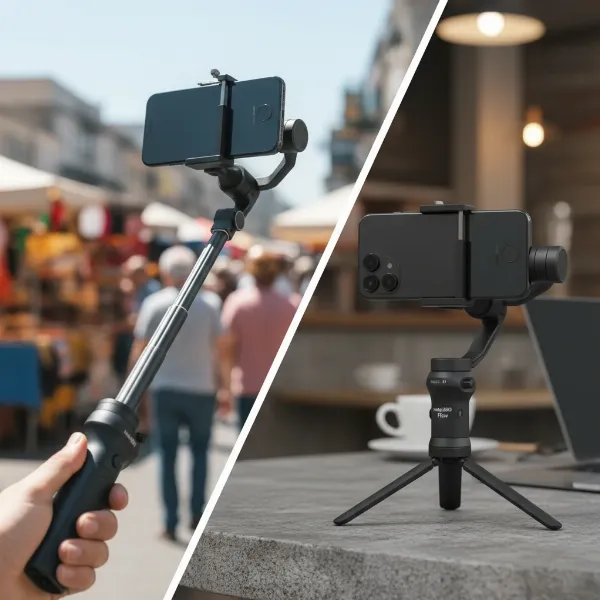
Stepping into the world of smooth, cinematic footage often leads creators to consider a gimbal. These incredible stabilization tools can transform shaky handheld shots into professional-looking video. However, new gimbals can be a significant investment, leading many to wonder: should you buy a used gimbal? While the prospect of saving money is appealing, purchasing pre-owned equipment, especially intricate electronics like gimbals, comes with its own set of considerations. This comprehensive guide will walk you through the essential checks and critical factors to ensure your used gimbal purchase is a smart and successful one.
The Allure of Used Gimbals: Weighing the Pros and Cons
The used market is a treasure trove for budget-conscious creators, offering substantial savings on equipment that might otherwise be out of reach. Gimbals, like many tech gadgets, depreciate in value rapidly, making them prime candidates for secondhand purchases. You could acquire a high-end model with advanced features for a fraction of its original price, allowing you to elevate your videography without breaking the bank. This accessibility to better gear can significantly impact your creative output and production quality.
However, the path of buying used isn’t without its pitfalls. Gimbals are complex devices with numerous delicate moving parts, motors, and electronic components. They are often subjected to demanding use by their previous owners, increasing the risk of hidden wear and tear or functional issues. Unlike new purchases, used gimbals typically come without a manufacturer’s warranty, leaving you responsible for any repairs that arise. Older models might also lack the latest features or compatibility with newer cameras. Navigating these risks requires diligence and a thorough understanding of what to inspect.
Types of Gimbals and Their Applications
Before diving into the inspection process, it’s crucial to understand the different types of gimbals available and which one best suits your needs. Each type is designed for specific cameras and shooting scenarios.
- Smartphone Gimbals: These are lightweight, compact, and designed to stabilize your mobile phone. They are perfect for casual users, vloggers, and social media content creators who prioritize portability and ease of use. Brands like DJI Osmo Mobile and Zhiyun Smooth series are popular in this category.
- DSLR/Mirrorless Gimbals: Stepping up in size and payload capacity, these gimbals are built to handle heavier cameras like DSLRs and mirrorless systems. They offer more robust stabilization, advanced control features, and often integrate with camera controls. Popular choices include the DJI Ronin-S/SC and Zhiyun Crane series, favored by independent filmmakers and videographers.
- Professional Cinema Gimbals: At the top tier, these gimbals are designed for large cinema cameras and heavy setups, offering the highest payload capacities and most sophisticated features. They are typically used in professional film and television production, often requiring two-handed operation or even vest support systems.
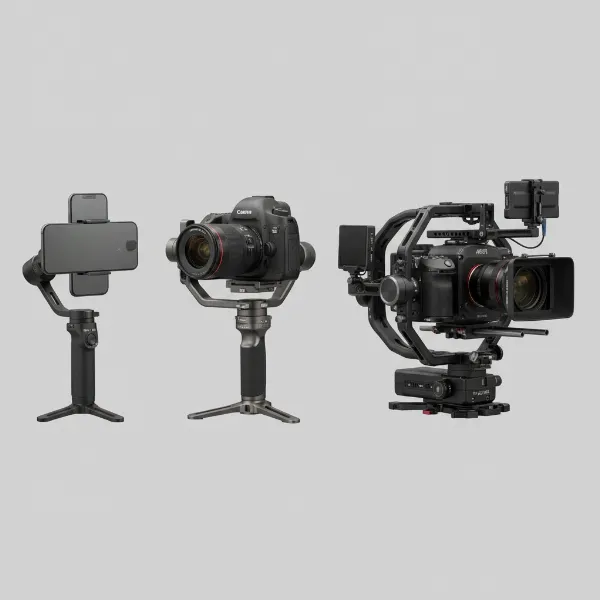 Different types of gimbals for smartphones, mirrorless cameras, and cinema cameras compared
Essential Checks Before Buying a Used Gimbal
When considering a used gimbal, a meticulous inspection is paramount. Don’t rely solely on seller descriptions; demand detailed evidence and, if possible, conduct an in-person test.
Physical Condition
The external appearance can tell you a lot about how the gimbal was treated.
- Scratches and Dents: Minor cosmetic scuffs are often acceptable, but deep scratches, dents, or signs of impact on the body or arms can indicate rough handling or drops. Pay close attention to the motor housing and structural components.
- Bent Arms: Carefully inspect all arms for any signs of bending or misalignment. Even a slight bend can severely affect balancing and stabilization performance.
- Smooth Movement (Powered Off): When the gimbal is off, all its moving parts should feel exceptionally smooth and move freely without any friction, grinding, or resistance. If any joint feels stiff, rough, or has inconsistent resistance, it suggests physical damage to the motor or bearings.
|
Our Picks for the Best Washing Machine in 2026
As an Amazon Associate I earn from qualifying purchases.
|
||
| Num | Product | Action |
|---|---|---|
| 1 | Giantex Portable Washing Machine, 17.6lbs Compact Washer Spinner Combo with Pump Drain, Twin Tub 11lbs Wash & 6.6lbs Spin, Lavadoras Portatiles for Apartment RV Dorm College (White & Blue) |

|
| 2 | COSTWAY Portable Washing Machine, Twin Tub 26lbs Capacity Laundry, 18lbs Washer and 8lbs Spinner Combo with Timer Knobs, Built-in Drain Pump, Compact Washer for Home Dorm Apartment (Grey+White) |
|
| 3 | Portable Washing Machine - Compact 2.0 Cu.ft Portable Washer, Full-Automatic Top Loader for Space Saving, Ideal for Apartments, Homes, and Dorms, 10 Wash Cycles, Low Noise, IPX4 with Drain Pump |
|
| 4 | Giantex Portable Washing Machine, 21lbs Capacity, 14.4lbs Washer and 6.6Llbs Spinner, Compact for Apartment RV, White & Gray, GT-GE-10390US-GR-FP |
|
| 5 | Giantex Portable Washing Machine, 20lbs Capacity, Twin Tub 2lbs Washer & 8lbs Spinner Combo, Compact for Apartment RV Dorms, Blue & White, GT24267-PE |
|
| 6 | COSTWAY Portable Washing Machine, Twin Tub 26 Lbs Capacity, 18 Lbs Washer and 8 Lbs Spinner, Compact Washer with Control Knobs, Timer Function, Drain Pump, Laundry washer for Apartment RV, Blue |
|
| 7 | COSTWAY Portable Washing Machine, Twin Tub 26lbs Capacity Laundry Washer, 18lbs Washer and 8lbs Spinner Combo with Timer Knobs, Built-in Drain Pump, Compact Washer for Home Dorm Apartment, Blue+White |
|
| 8 | Portable Washing Machine,16L Upgraded Large Capacity Portable Washer With 3 Modes Deep Cleaning.Suitable For Travel, Camping,Apartments, Dormitories, Hotels (Green) |
|
| 9 | Waterjoy Portable Washing Machines, 7.7 lbs Load Capacity Portable Washer and Dryer Combo with Built-in Barrel Light & LED Display for Household and Apartment (Blue) |
|
| 10 | Avanti Portable Compact Washing Machine for Clothes/Laundry, 0.84 Cu. Ft. Capacity, Standard Sink/Faucet Attachment for Apartment, Dorm, RV, White |
|
Motor Functionality
The motors are the heart of a gimbal. Their proper operation is critical for smooth footage.
- Noises and Vibrations: Power on the gimbal and listen for any unusual buzzing, grinding, or clicking noises. A healthy gimbal should operate quietly. During operation, hold it and feel for any excessive vibrations.
- Smooth Panning and Tilting: Test all axes (pan, tilt, roll) by gently moving the gimbal. The movements should be fluid and responsive, without any jerky motions, stuttering, or “flopping around” when the camera is mounted and balanced.
- Calibration: Ask the seller if the gimbal has ever needed recalibration or if it consistently drifts. While recalibration can often fix minor issues, persistent problems might indicate deeper motor or sensor faults.
Battery Health
Gimbals are power-hungry devices, and battery health is a major concern with used units.
- Capacity and Runtime: Inquire about the battery’s typical runtime and how old it is. Batteries degrade over time, and a severely degraded battery might require frequent recharging or even replacement, adding to your overall cost.
- Charging Issues: Ensure the battery charges correctly and holds a charge without overheating. Test all charging ports and cables if possible.
Compatibility
A gimbal is useless if it doesn’t work with your camera setup.
- Weight and Size Capacity: This is non-negotiable. Check the gimbal’s maximum payload capacity and ensure your camera body, lens, and any accessories (microphone, monitor) fall within this limit. Also, confirm that your longest lens physically fits within the gimbal’s dimensions and can be balanced.
- Camera Control: Many gimbals offer camera control via USB cables (e.g., start/stop recording, focus, zoom). If this feature is important to you, verify that the gimbal model is compatible with your specific camera brand and model.
Software and Firmware
Modern gimbals rely heavily on software.
- Firmware Version: Ask the seller about the current firmware version. Outdated firmware can lead to performance issues or missing features. Ideally, you want a gimbal that can still receive firmware updates from the manufacturer.
- App Functionality: If the gimbal uses a companion app, ensure it connects smoothly and all functions within the app are accessible and working.
Accessories
Consider what comes with the gimbal.
- Original Components: Check for essential accessories like the original box, charging cables, quick-release plates, lens support, tripod stand, and any counterweights. Missing crucial parts can be expensive to replace.
Seller’s History and Reputation
Where you buy can be as important as what you buy.
- Reputable Dealers: Buying from established companies like B&H Photo or Adorama (or their international equivalents) that sell used and refurbished gear often provides a safer option. They typically offer detailed condition descriptions and return policies.
- Private Sellers: When dealing with private sellers (e.g., eBay, Facebook Marketplace), be extra cautious. Ask for detailed, current photos and videos of the actual unit, not promotional images. Request a live video demonstration or, ideally, arrange an in-person meeting to test the gimbal yourself. Always inquire why they are selling it.
> “Always approach a used gimbal purchase with a ‘test before you trust’ mindset. The motors are the most critical component; ensure their smooth, quiet operation above all else.” – John Doe, Veteran Videographer & Gear Expert
Common Issues to Watch Out For in Used Gimbals
Understanding typical gimbal problems can help you identify red flags during your inspection.
- Unstable or Jittery Footage: This is the most common and frustrating issue. It can stem from various causes, including a poorly balanced camera, loose connections, faulty motors, or software glitches. If, after proper balancing, the gimbal still produces shaky footage, it’s a major concern.
- Non-Smooth Panning or Tilting: If the gimbal struggles to pan or tilt smoothly, or if it exhibits jerky movements along any axis, it could indicate obstructions, a loose camera connection, or a faulty motor.
- Strange Noises: Any grinding, buzzing, or clicking sounds during operation are serious red flags, often signaling problems with the motors or bearings. Stop using it immediately if you hear such noises.
- Failure to Power On: This could be a simple battery issue, but it might also point to problems with the power supply or internal circuit board. Always ensure the gimbal powers on and stays on.
- Previous Modifications or Water Damage: Ask the seller if any modifications have been made to the gimbal’s physical state or control board programming. Furthermore, inquire about its usage in adverse weather conditions. Visible physical damage is obvious, but water damage can be insidious and cause intermittent failures.
Comparing Popular Gimbal Brands for Used Purchases
The used market frequently features gimbals from several leading brands, each with its strengths.
| Feature / Brand | DJI (Ronin, Osmo) | Zhiyun (Crane, Weebill) | FeiyuTech / Moza (Others) |
|---|---|---|---|
| Market Presence | Very High, wide range of models | High, strong competitor | Moderate, niche markets or specific features |
| Build Quality | Generally robust, premium feel | Good, often lighter weight | Varies by model, generally good |
| Features | Advanced stabilization, intelligent tracking | Innovative designs, often good value | Competitive features, some unique offerings |
| Used Availability | Plentiful, popular models easily found | Common, good options for various budgets | Less frequent, but can find good deals |
| Software/App | Intuitive, feature-rich apps | Reliable apps, regular updates | Functional, may vary in user-friendliness |
| Parts/Support | Good, wide service network (for newer models) | Decent, active user community | Can be harder for older or less common models |
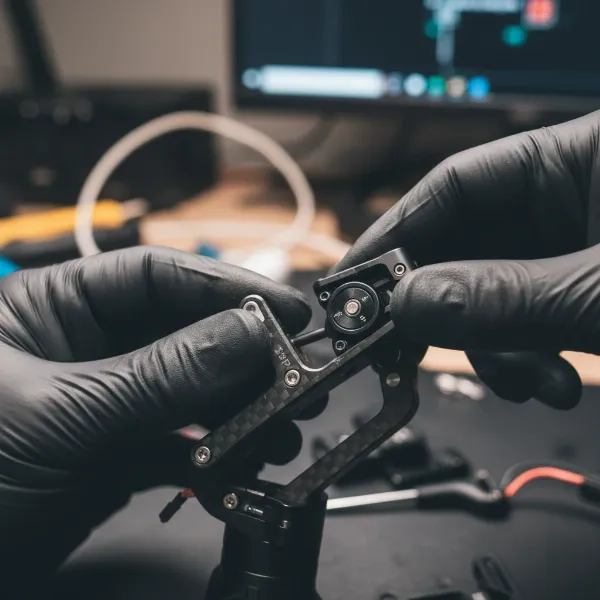 A person meticulously inspecting a used gimbal for physical damage and motor function.
Your Comprehensive Used Gimbal Buying Guide: From Budget to Warranty
Making an informed decision on a used gimbal involves careful planning and execution.
Budgeting for Your Purchase
Determine your maximum budget for a used gimbal. While cost savings are a primary driver, remember that extremely low prices might signal significant underlying issues. Compare prices of similar used models across different platforms to get a realistic idea of market value. Factor in potential costs for replacement batteries or minor repairs when setting your budget.
Assessing Your Needs
Before even looking, define your specific requirements.
- Camera System: What camera body and lenses will you be using? This dictates the necessary payload capacity.
- Shooting Style: Are you a vlogger needing something portable, or a filmmaker requiring heavy-duty stabilization for dynamic shots?
- Features: Do you need advanced features like active track, follow focus, or specific shooting modes? Newer gimbals offer more, but older models might suffice for basic stabilization.
Inspection Best Practices
- Request Visuals: Always ask for detailed, recent photos and, crucially, a video demonstrating the gimbal’s full functionality with a camera mounted and balanced. The video should show all axes moving smoothly, with no weird noises or vibrations.
- In-Person Test: If possible, meet the seller in person and test the gimbal with your actual camera setup. This is the absolute best way to verify its condition and functionality. Perform basic balancing, power it on, and test all modes and controls.
- Ask Direct Questions: Don’t hesitate to ask about the gimbal’s history: how often was it used? Has it ever been dropped or serviced? Why is the seller letting it go?
Understanding Warranty and Returns
Most used purchases, especially from private sellers, come without a warranty. Reputable used gear retailers may offer a limited warranty or a return window, which provides crucial peace of mind. Clarify the return policy before you commit to buying, as returning a secondhand item can be complex or impossible. If an older model is no longer sold new, check if the manufacturer still provides parts or service.
Maximizing the Lifespan of Your Used Gimbal
Once you’ve successfully acquired a used gimbal, proper care and maintenance will ensure it continues to deliver smooth footage for years to come.
- Regular Cleaning and Inspection: Keep your gimbal free of dust, dirt, and debris, especially around the motors and joints. Debris can cause friction and damage bearings. Regularly inspect for any new signs of wear or loose screws.
- Avoid Extreme Conditions: Gimbals are sensitive to extreme temperatures and humidity, which can damage internal components. Do not operate your gimbal in heavy rain, dust storms, or excessively hot or cold environments.
- Proper Balancing: Always balance your camera perfectly on the gimbal before powering it on. An unbalanced setup puts unnecessary strain on the motors and can lead to overheating and premature wear.
- Gentle Handling: Gimbals are precision instruments. Avoid sudden, jerky movements or overloading them. When transporting, use a dedicated padded case to protect it from impacts.
- Firmware Updates: Regularly check for and install firmware updates from the manufacturer. These updates often fix bugs, improve performance, and add new features.
Conclusion
Deciding whether to buy a used gimbal is a balancing act between significant cost savings and potential risks. While pre-owned units can be a fantastic way to access professional stabilization technology at an affordable price, a lack of due diligence can lead to costly repairs or disappointing performance. By thoroughly inspecting the physical condition, testing motor functionality, assessing battery health, ensuring compatibility, and verifying the seller’s credibility, you can greatly increase your chances of a successful purchase. An informed buyer is a smart buyer, and with the right precautions, a used gimbal can become an invaluable asset in your creative toolkit, delivering beautifully stable footage without breaking your budget.
What’s the best piece of advice you’ve ever received when buying used tech gear?
Frequently Asked Questions
Is it risky to buy a used gimbal?
Yes, buying a used gimbal carries inherent risks due to its delicate electronic and mechanical components. Hidden damage, battery degradation, or lack of warranty are common concerns that require careful inspection before purchase.
What are the most important things to check on a used gimbal?
The most critical checks include ensuring all motors move smoothly without friction when powered off, testing powered operation for smooth panning/tilting and absence of strange noises, and verifying battery health and runtime.
Can I test a used gimbal before buying it?
Absolutely, and it’s highly recommended. If possible, meet the seller in person to test the gimbal with your camera setup. Otherwise, request detailed video demonstrations of its full functionality.
What kind of cameras are compatible with used gimbals?
Compatibility depends on the gimbal’s specific model and its payload capacity. Always check the gimbal’s maximum weight and size specifications against your camera body, lens, and any accessories to ensure a proper fit and balance.
Do used gimbals come with a warranty?
Most used gimbals, especially from private sellers, do not come with a manufacturer’s warranty. Some reputable used gear retailers might offer a limited store warranty or a return period, so always clarify this before purchasing.
How do I know if the gimbal’s motors are damaged?
Signs of damaged motors include stiff or rough movement when powered off, buzzing or grinding noises during operation, jerky or unstable camera movements, and difficulty holding balance even after proper calibration.