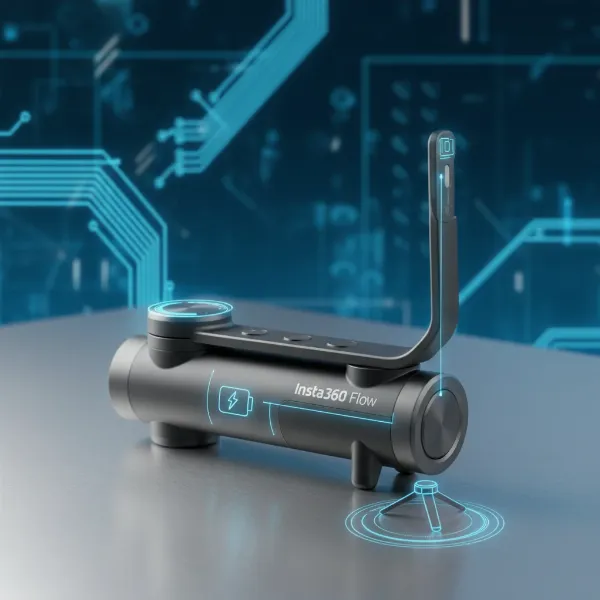
The Samsung Galaxy S24 Ultra stands as a titan in mobile technology, boasting a camera system that rivals many dedicated cameras. With its incredible optical image stabilization (OIS) and advanced computational photography, it’s a dream device for content creators and casual users alike. However, even the most sophisticated in-built stabilization has its limits, especially when aiming for truly cinematic, buttery-smooth footage. This is where a high-quality gimbal becomes indispensable, transforming your S24 Ultra from a great phone camera into a professional-grade filmmaking tool. This comprehensive guide will walk you through the essential considerations and top recommendations to help you choose the perfect gimbal for your Samsung Galaxy S24 Ultra, unlocking its full potential for stunning visual content.
The Samsung Galaxy S24 Ultra: A Filmmaker’s Dream (and Challenge)
The Samsung Galaxy S24 Ultra is undoubtedly a powerhouse for mobile photography and videography. Its quad-camera setup, including a 200MP main sensor, advanced zoom capabilities, and the ability to shoot breathtaking 8K video, positions it as a leading device for capturing life’s moments in exquisite detail. The enhanced OIS helps smooth out minor shakes and jitters, making handheld shots more stable than ever before. Yet, despite these impressive internal features, achieving professional-level smoothness for dynamic shots, panning, or complex camera movements often requires external assistance. A gimbal provides mechanical stabilization across multiple axes, eliminating unwanted motion and delivering fluid, professional-looking video that even the best in-phone stabilization cannot replicate, especially when walking, running, or capturing fast-moving subjects.
Key Factors When Choosing a Gimbal for Your S24 Ultra
Selecting the ideal gimbal for your Samsung Galaxy S24 Ultra involves more than just picking a popular brand. The S24 Ultra’s substantial size and weight necessitate specific considerations to ensure compatibility, performance, and an optimal user experience. Understanding these key factors will help you make an informed decision that aligns with your filming needs and budget.
Compatibility & Payload Capacity
The Samsung Galaxy S24 Ultra is a large and relatively heavy smartphone, especially when protected by a case. Therefore, the first and most critical factor is ensuring the gimbal can securely hold and effectively stabilize its weight and dimensions. Look for gimbals with a robust clamp design that can accommodate the S24 Ultra’s width, and crucially, a high enough payload capacity to handle its weight. Overloading a gimbal can lead to poor stabilization, increased motor strain, and reduced battery life. Always check the manufacturer’s specifications for maximum payload.
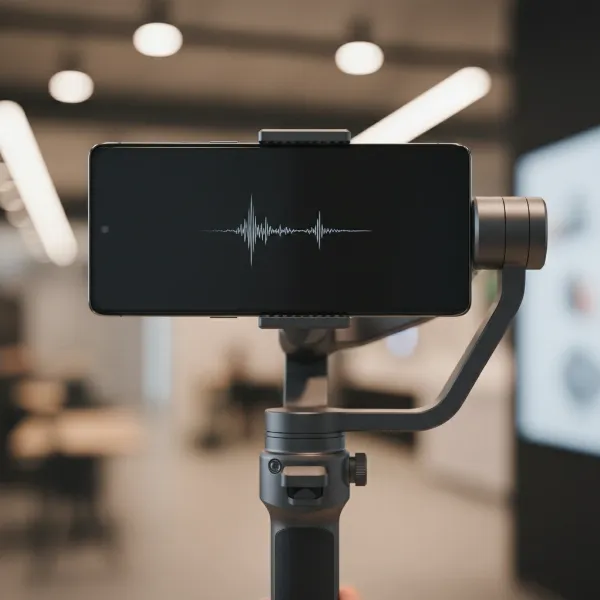 Samsung S24 Ultra securely mounted on a smartphone gimbal, demonstrating proper payload capacity and fit.
Stabilization Performance
Most modern smartphone gimbals offer 3-axis stabilization, correcting motion across the roll, pitch, and yaw axes. This is the gold standard for achieving truly cinematic smoothness. Evaluate reviews and demonstrations to gauge a gimbal’s ability to maintain a steady horizon, perform smooth tilts and pans, and effectively cancel out vibrations, particularly under various movement scenarios like walking or running. Advanced algorithms and powerful motors contribute significantly to superior stabilization.
Features & Modes
Beyond basic stabilization, gimbals come packed with intelligent features and shooting modes that can dramatically enhance your creative output. Look for functionalities such as:
- Active Tracking: This allows the gimbal to automatically follow a subject, keeping them perfectly framed.
- Gesture Control: Start/stop recording or trigger tracking with a simple hand gesture.
- Built-in Fill Light: Essential for illuminating subjects in low-light conditions or adding catchlights.
- Creative Modes: Dolly Zoom (Vertigo effect), Panorama, Timelapse, Hyperlapse, SpinShot (barrel roll).
These features add versatility and open up new possibilities for storytelling with your S24 Ultra.
Ergonomics & Portability
Consider how the gimbal feels in your hand and its overall design. A comfortable grip is essential for extended shooting sessions. Portability is also key if you plan to travel or shoot on the go. Many gimbals now feature foldable designs, making them compact and easy to carry in a bag. Factor in the total weight of the gimbal itself, as this contributes to user fatigue over time. A good balance between feature-rich design and practical portability is often desired.
Battery Life
A gimbal’s battery life determines how long you can shoot without needing to recharge. Most gimbals offer several hours of operation, but heavy usage of features like active tracking or fill lights can deplete the battery faster. Look for models with ample battery capacity, and ideally, those that can also charge your S24 Ultra while in use, extending your phone’s shooting time as well. Fast charging capabilities for the gimbal itself can also be a significant advantage.
App Integration & Ecosystem
The dedicated app that accompanies your gimbal is crucial for unlocking its full potential. A good app should offer intuitive controls, access to various shooting modes, and seamless integration with your S24 Ultra’s camera. Some apps may even offer advanced editing features. Check reviews for Android compatibility and user experience, as some apps perform better on iOS. Ideally, you want an app that allows you to control most camera functions without frequently touching your phone screen.
Top Gimbals Recommended for Samsung Galaxy S24 Ultra Users
When it comes to top-tier smartphone gimbals, a few brands consistently stand out for their innovation, performance, and reliability. These models are generally well-suited for larger phones like the Samsung Galaxy S24 Ultra, offering robust stabilization and a rich feature set to elevate your mobile filmmaking. Here are some of the leading contenders:
DJI Osmo Mobile 6
The DJI Osmo Mobile 6 is a highly popular choice renowned for its user-friendly design and powerful intelligent features. It boasts a compact, foldable form factor, making it incredibly portable. Its magnetic quick-release clamp ensures rapid attachment and detachment of your S24 Ultra, while the improved ActiveTrack 6.0 offers precise and reliable subject tracking. The built-in extension rod is a convenient addition for capturing dynamic low-angle shots or fitting more into your frame. While it’s generally an excellent all-rounder, its advanced features do come at a premium price point, and some users might find the initial learning curve for its comprehensive app somewhat steep.
Zhiyun Smooth 5S
For creators seeking a more professional and robust experience, the Zhiyun Smooth 5S is a compelling option. It features more powerful motors designed to handle heavier phones and accessories, making it very suitable for the S24 Ultra. The Smooth 5S stands out with its integrated fill light, offering adjustable brightness and color temperature for superior lighting on the go. Its physical control panel provides tactile access to settings, which many filmmakers prefer over screen-only controls. However, its larger size and weight compared to some competitors mean it’s less pocket-friendly, and its more advanced controls might be intimidating for absolute beginners.
Insta360 Flow
The Insta360 Flow enters the market with a unique and innovative design, integrating a built-in tripod and a selfie stick into its compact, foldable body. This all-in-one solution is incredibly convenient for diverse shooting scenarios. Its “Deep Track 3.0” is celebrated for its highly accurate and persistent subject tracking, even when subjects are briefly obscured. The Flow’s smart wheel provides intuitive controls, and its robust build quality inspires confidence. While it offers excellent portability and versatility, users should verify its app’s full compatibility and feature set specific to Android and the S24 Ultra, as some features might vary across operating systems. It strikes a great balance between portability and advanced tracking capabilities.
Detailed Comparison Table: Top Gimbals for S24 Ultra
Choosing the right gimbal often comes down to a trade-off between features, portability, and budget. This table provides a quick comparison of the three recommended gimbals, highlighting their key characteristics to help you match them with your specific priorities for your Samsung Galaxy S24 Ultra.
| Feature | DJI Osmo Mobile 6 | Zhiyun Smooth 5S | Insta360 Flow |
|---|---|---|---|
| Payload Capacity | Excellent (Handles S24 Ultra) | Superior (Heavier phones/acc) | Excellent (Handles S24 Ultra) |
| Portability | High (Foldable, lightweight) | Medium (Larger, heavier) | High (Foldable, all-in-one) |
| Key Features | ActiveTrack 6.0, Ext. Rod, Mag. Clamp | Powerful Motors, Built-in Fill Light, Pro Controls | Deep Track 3.0, Built-in Tripod/Stick, Smart Wheel |
| Ease of Use | Good (Intuitive app, quick setup) | Moderate (More pro controls) | Good (Smart Wheel, auto setup) |
| Battery Life (approx.) | ~6.5 hours | ~12 hours | ~12 hours |
| Price Range | Mid-High | High | Mid-High |
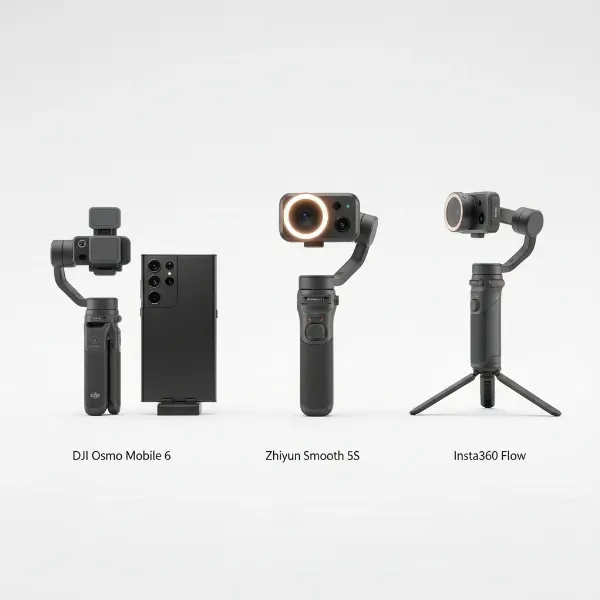 Three top smartphone gimbals (DJI Osmo Mobile 6, Zhiyun Smooth 5S, Insta360 Flow) displayed for Samsung S24 Ultra.
Buying Guide: Making the Right Choice for Your S24 Ultra
Navigating the market for the best gimbal requires a clear understanding of your personal needs and how they align with the available options. The Samsung Galaxy S24 Ultra is a premium device, and pairing it with the right stabilizer will significantly enhance your creative output. Consider these practical steps to guide your purchase decision.
Budget
Establish a clear budget before you start shopping. Gimbals range widely in price, from entry-level options around $80-$100 to professional-grade models exceeding $200. While cheaper gimbals might offer basic stabilization, investing a bit more can unlock superior performance, better build quality, and more advanced features that are particularly beneficial when working with a high-end phone like the S24 Ultra. Determine the maximum amount you’re comfortable spending to narrow down your choices effectively.
Usage Needs
Think about how you plan to use your gimbal most frequently. Are you a casual vlogger who needs something simple and portable for everyday clips, or are you a serious content creator aiming for cinematic short films and professional productions? If your primary goal is simple, stable vlogging on the go, a compact and user-friendly model like the DJI Osmo Mobile 6 might be perfect. For more controlled, professional shoots requiring precise movements and additional lighting, the Zhiyun Smooth 5S could be a better fit. Your usage frequency and specific creative ambitions should heavily influence your choice.
Portability vs. Features
This is often a key trade-off. Highly portable gimbals tend to be lighter and more compact, making them easy to carry for spontaneous shoots or travel. However, they might sometimes compromise on motor power or advanced features. Gimbals with more robust features, larger batteries, or built-in lights might be bulkier and heavier, sacrificing a bit of portability for enhanced capabilities. Decide which aspect is more crucial for your workflow. Do you prioritize convenience on the go, or do you need every feature possible for intricate filmmaking?
Ease of Use
If you are new to gimbals, a model with a user-friendly interface, quick setup, and intuitive app controls will provide a smoother learning curve. Some gimbals are designed with beginners in mind, offering auto-calibration and simplified modes. More advanced gimbals, while offering greater control, might require more time to master their functions and settings. Consider whether you prefer a plug-and-play experience or are willing to invest time in learning a more complex system to achieve precise results.
Warranty & Support
Always consider the manufacturer’s warranty and customer support. Electronic devices can sometimes encounter issues, and having reliable after-sales service is invaluable. Research the brand’s reputation for warranty claims, available repair services, and the ease of getting technical assistance. A strong support system ensures peace of mind and helps you quickly resolve any potential problems with your gimbal.
Tips for Mastering Your S24 Ultra and Gimbal
Integrating a gimbal into your mobile filmmaking workflow can dramatically elevate the quality of your content. To get the most out of your Samsung Galaxy S24 Ultra and its new stabilizing companion, consider these practical tips. These techniques will help you achieve professional-looking footage and unlock creative possibilities that go beyond simple point-and-shoot videography.
First and foremost, always balance your phone properly on the gimbal before powering it on. This is perhaps the most crucial step for optimal performance. An unbalanced phone puts unnecessary strain on the gimbal’s motors, leading to reduced battery life, less effective stabilization, and potential damage over time. Most gimbals have an arm that you can adjust to center the phone’s weight. Take a few moments to ensure your S24 Ultra sits level and doesn’t lean heavily in one direction before activating the gimbal.
Next, practice different shooting modes and movements. Gimbals offer a variety of intelligent modes like ActiveTrack, Dolly Zoom, and time-lapse. Experiment with these features in different scenarios to understand their capabilities and limitations. Practice smooth panning, tilting, and walking techniques. The more you familiarize yourself with the gimbal’s movements and controls, the more natural and cinematic your footage will become. Don’t be afraid to try unique angles and dynamic movements that would be impossible handheld.
Make it a habit to utilize the gimbal’s dedicated app features. These apps often provide a wealth of control over your S24 Ultra’s camera settings, including exposure, white balance, and focus, directly from the gimbal interface. They also unlock many of the advanced shooting modes mentioned earlier. Spending time exploring the app’s interface and customizing settings to match your creative vision will significantly enhance the quality and versatility of your shots. Many apps also offer tutorials or guides to help you get started.
Regularly keep your gimbal’s firmware updated. Manufacturers frequently release firmware updates that improve stabilization performance, add new features, and enhance compatibility with the latest smartphones like the S24 Ultra. Check the gimbal’s app periodically for available updates and follow the instructions carefully to ensure your device is running with the most current optimizations. This simple maintenance step can prevent bugs and ensure you’re always getting the best possible performance.
Finally, consider investing in external audio and lighting accessories. While the S24 Ultra’s camera is exceptional, its built-in microphone and flash have limitations for professional-grade audio and illumination. Attaching a small external microphone can drastically improve sound quality, especially in noisy environments or when capturing dialogue. Similarly, a portable LED fill light (if not integrated into your gimbal) can provide professional lighting for interviews or product shots. Many gimbals have accessory mounts (cold shoe or 1/4″-20 threads) for these additions, turning your setup into a true mobile production kit.
“A great gimbal doesn’t just stabilize; it empowers your S24 Ultra to tell stories with fluid, professional motion that captivates your audience.” – Alex Chen, Mobile Videography Expert
Conclusion
Choosing the best gimbal for your Samsung Galaxy S24 Ultra is an investment in your creative journey. By considering factors like payload capacity, stabilization performance, essential features, and app integration, you can find a device that perfectly complements your S24 Ultra’s advanced camera capabilities. Whether you opt for the portable versatility of the DJI Osmo Mobile 6, the professional robustness of the Zhiyun Smooth 5S, or the innovative all-in-one design of the Insta360 Flow, the right gimbal will unlock a new realm of cinematic possibilities. Elevate your mobile filmmaking and capture stunning, smooth footage that truly stands out. Which gimbal will you choose to transform your Samsung Galaxy S24 Ultra into the ultimate storytelling machine?
Frequently Asked Questions
Do I really need a gimbal for S24 Ultra with OIS?
Yes, while the S24 Ultra has excellent OIS, a 3-axis gimbal provides mechanical stabilization that eliminates larger shakes and allows for complex, fluid camera movements impossible with in-phone stabilization alone. It’s essential for truly cinematic and professional-looking video, especially when moving or panning.
What’s the best gimbal for S24 Ultra for beginners?
For beginners, the DJI Osmo Mobile 6 is highly recommended due to its intuitive controls, quick setup with a magnetic clamp, and user-friendly app. Its compact, foldable design also makes it very portable and easy to carry for spontaneous shoots, offering a great balance of features and ease of use.
Can I use the S24 Ultra’s native camera app with a gimbal?
Many gimbals allow basic record/stop functionality with the native camera app, but to access advanced features like ActiveTrack, custom shooting modes, or precise camera settings (ISO, shutter speed), you’ll typically need to use the gimbal’s dedicated companion app. Always check for specific app compatibility.
Are gimbals hard to set up and use?
Modern smartphone gimbals are generally designed for ease of use. Initial setup involves balancing your S24 Ultra, which takes a few minutes but is crucial. Once balanced, most gimbals connect via Bluetooth, and their apps provide intuitive controls. Practicing a few times will make the process very quick and natural.
What is payload capacity and why is it important for the S24 Ultra?
Payload capacity refers to the maximum weight a gimbal can effectively stabilize. For the S24 Ultra, which is a larger and heavier phone, a good payload capacity ensures the gimbal’s motors aren’t strained, providing optimal stabilization performance and longer motor lifespan. Always choose a gimbal rated to handle your phone’s weight, especially if you use a case.