In the dynamic world of videography, a reliable camera gimbal is an indispensable tool for capturing smooth, cinematic footage. The Moza AirCross 3 emerges as a compelling contender, boasting a distinctive convertible design that promises unprecedented versatility. But does this innovative approach truly translate into practical benefits for professional video creators? This comprehensive review delves into the Moza AirCross 3, evaluating its design innovations, core features, and real-world usability to help you determine if it’s the right fit for your filmmaking arsenal.
The Moza AirCross 3: A Design Revolution?
The standout feature of the Moza AirCross 3 is its revolutionary 4-in-1 convertible design. This gimbal is engineered to transform effortlessly, adapting to various shooting scenarios and operator preferences. Whether you’re aiming for a classic upright stance, a low-angle “sling” shot, a two-handed grip for enhanced stability, or an extended grip for unique perspectives, the AirCross 3 can reconfigure itself to meet the demands. The key to this adaptability lies in its foldable handle, which allows quick changes from a vertical to a horizontal position, optimizing comfort and control across different shooting modes.
Beyond its transformative capabilities, the AirCross 3 also impresses with its robust build quality. Crafted from a durable and lightweight metal body, the gimbal exudes a premium feel that suggests longevity, offering a more rugged alternative to its predecessor, the AirCross 2, which featured a plastic housing. The sleek black matte finish contributes to its professional aesthetic, although it’s worth noting that this finish may be prone to scratches with regular use.
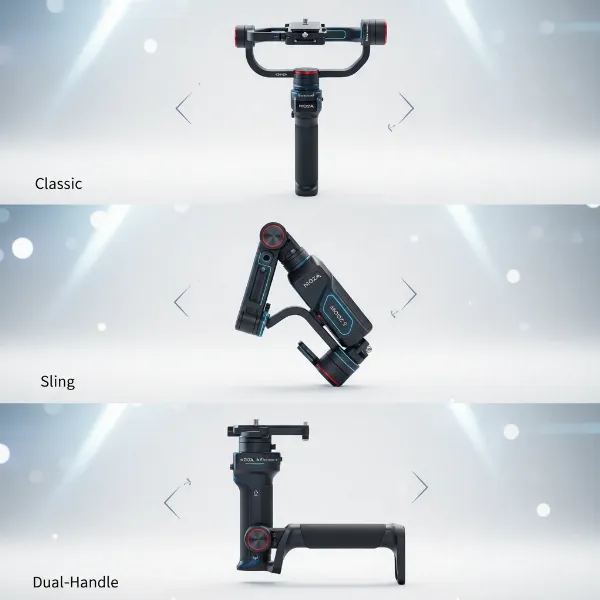 Moza AirCross 3 gimbal showcasing its unique convertible 4-in-1 design for versatile camera stabilization.
Key Features and Specifications
Understanding the technical prowess of a gimbal is crucial for assessing its performance. The Moza AirCross 3 is equipped with a suite of features designed to support demanding production environments.
First, its impressive payload capacity of up to 3.2 kg (7.05 lbs) ensures compatibility with a broad spectrum of cameras, from compact mirrorless systems to larger DSLR setups. This wide-ranging support means filmmakers aren’t restricted by their camera choice, offering significant flexibility.
Battery life is another critical factor for on-location shoots, and the AirCross 3 delivers commendably with up to 20 hours of operation on a single charge during normal use, with some users reporting around 19 hours. Recharging is convenient and swift, taking approximately 1.4 hours via a USB-C port, ensuring minimal downtime. The gimbal also incorporates the Spark Power Supply System 3.0, an advanced power management system that contributes to its extended operational hours.
For connectivity and accessory integration, the AirCross 3 features two cold shoe mounts and three mounting threads. These additions enable users to attach vital accessories such as external monitors, microphones, or additional handles, expanding the gimbal’s utility on set. Control over the gimbal’s functions and settings is facilitated through the MOZA Master app, available for both iOS and Android devices, offering remote adjustments and enhanced operational fluidity.
Looking to the future, the AirCross 3 is set to receive an artificial intelligence (AI) tracking module, which will enable hand gesture control for intelligent subject tracking. This forward-thinking addition promises to further streamline solo operations and enhance creative possibilities.
Is It Practical? Real-World Usability Assessment
The true test of an innovative design lies in its practicality during real-world use. The Moza AirCross 3 presents a mixed bag, offering significant advantages alongside a few considerations for users.
Pros of Practicality
|
Our Picks for the Best Washing Machine in 2026
As an Amazon Associate I earn from qualifying purchases.
|
||
| Num | Product | Action |
|---|---|---|
| 1 | Portable Washing Machine,16L Upgraded Large Capacity Portable Washer With 3 Modes Deep Cleaning.Suitable For Travel, Camping,Apartments, Dormitories, Hotels (Green) |

|
| 2 | Giantex Portable Washing Machine, 17.6lbs Compact Washer Spinner Combo with Pump Drain, Twin Tub 11lbs Wash & 6.6lbs Spin, Lavadoras Portatiles for Apartment RV Dorm College (White & Blue) |
|
| 3 | Portable Washing Machine - Compact 2.0 Cu.ft Portable Washer, Full-Automatic Top Loader for Space Saving, Ideal for Apartments, Homes, and Dorms, 10 Wash Cycles, Low Noise, IPX4 with Drain Pump |
|
| 4 | COSTWAY Portable Washing Machine, Twin Tub 26 Lbs Capacity, 18 Lbs Washer and 8 Lbs Spinner, Compact Washer with Control Knobs, Timer Function, Drain Pump, Laundry washer for Apartment RV, Blue |
|
| 5 | COSTWAY Portable Washing Machine, Twin Tub 26lbs Capacity Laundry Washer, 18lbs Washer and 8lbs Spinner Combo with Timer Knobs, Built-in Drain Pump, Compact Washer for Home Dorm Apartment, Blue+White |
|
| 6 | Waterjoy Portable Washing Machines, 7.7 lbs Load Capacity Portable Washer and Dryer Combo with Built-in Barrel Light & LED Display for Household and Apartment (Blue) |
|
| 7 | COSTWAY Portable Washing Machine, Twin Tub 26lbs Capacity Laundry, 18lbs Washer and 8lbs Spinner Combo with Timer Knobs, Built-in Drain Pump, Compact Washer for Home Dorm Apartment (Grey+White) |
|
| 8 | Giantex Portable Washing Machine, 20lbs Capacity, Twin Tub 2lbs Washer & 8lbs Spinner Combo, Compact for Apartment RV Dorms, Blue & White, GT24267-PE |
|
| 9 | Avanti Portable Compact Washing Machine for Clothes/Laundry, 0.84 Cu. Ft. Capacity, Standard Sink/Faucet Attachment for Apartment, Dorm, RV, White |
|
| 10 | Giantex Portable Washing Machine, 21lbs Capacity, 14.4lbs Washer and 6.6Llbs Spinner, Compact for Apartment RV, White & Gray, GT-GE-10390US-GR-FP |
|
The foldable design is a major win for portability, making the AirCross 3 remarkably easy to transport in a backpack, especially when compared to bulkier, non-folding gimbals. This compact form factor is particularly beneficial for videographers who are constantly on the move or require discrete setups. The axis locks simplify the balancing process, allowing for quicker setup times, a vital aspect when working under tight schedules. Users often praise the gimbal’s overall stable performance, delivering smooth footage across various movements and camera angles. Its inherent versatility, stemming from the convertible design, empowers creators to achieve diverse shot compositions, from classic cinematic glides to dynamic low-angle tracking shots, without needing multiple stabilization tools. For those who prefer a more streamlined experience, the simplified controls offer a faster way to get shooting, though this comes with a slight trade-off for advanced users.
Cons of Practicality
Despite its many strengths, the Moza AirCross 3 does have some practical limitations. The standard grip, while functional, can feel quite short for extended shooting periods, potentially leading to hand fatigue. Many users find it necessary to attach dedicated extensions or a small tripod to the base for improved ergonomics and stability during longer takes. A notable design quirk is that the roll motor arm can sometimes obstruct the camera’s screen, making it challenging to monitor your shots directly without adjusting your viewing angle. Furthermore, while the controls are simplified, the gimbal’s small display and user interface are not ideal for quickly adjusting more advanced settings, which might frustrate experienced users accustomed to more comprehensive on-device controls. The included small tripod legs, while useful for setting the gimbal down, have been noted to occasionally shift or lack absolute rigidity during active use. Lastly, as mentioned, the matte finish, despite its aesthetic appeal, can scratch relatively easily, potentially affecting the gimbal’s pristine look over time.
Moza AirCross 3 vs. The Competition
When considering the Moza AirCross 3, it’s natural to compare it with other gimbals in the market, including its predecessors. It positions itself as a compelling alternative to larger and heavier gimbals like the Moza Air 2S, especially for those primarily shooting with lighter mirrorless camera setups. While the Air 2S might handle heavier payloads with ease, the AirCross 3 offers superior portability and a more versatile form factor without sacrificing much in terms of stabilization for its target camera range.
In terms of cost, the Moza AirCross 3 typically enters the market at a price point around $469 for the basic kit, making it slightly more expensive than previous AirCross models but still competitive within its class, considering its innovative design and feature set. This price increase, however, is often justified by the advanced convertible capabilities and improved build quality.
Who Is The Moza AirCross 3 For?
The Moza AirCross 3 is ideally suited for a specific segment of content creators and videographers. It is an excellent choice for professional videographers and passionate content creators who frequently work with mirrorless and lighter DSLR cameras and require a highly versatile and portable stabilization solution. If your workflow demands quick transitions between different shooting styles—from run-and-gun to more deliberate, low-angle shots—the convertible design of the AirCross 3 will be a significant asset. It’s also a strong contender for those who prioritize a premium build quality and extended battery life for all-day shoots.
However, if you predominantly use very heavy camera setups that push beyond the 3.2 kg payload limit, or if you require an extremely intricate and customizable user interface directly on the gimbal, you might find other, more specialized gimbals to be a better fit. Ultimately, your budget, specific shooting needs, and a preference for an innovative, convertible design should guide your purchasing decision.
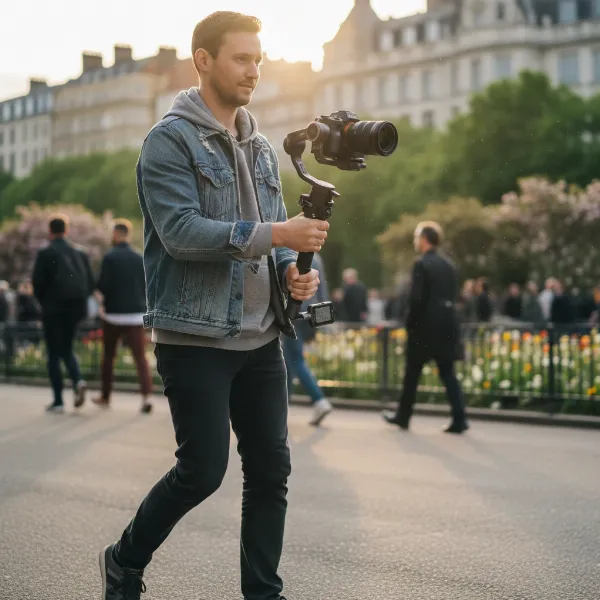 A filmmaker skillfully operating the Moza AirCross 3 gimbal with a mirrorless camera in an outdoor setting, demonstrating its practical use.
Tips for Maximizing Your Moza AirCross 3 Experience
To get the most out of your Moza AirCross 3, consider these practical tips. Given the short standard grip, investing in dedicated handle extensions or a comfortable sling handle can significantly improve ergonomics and reduce fatigue during prolonged shooting sessions. Always perform a thorough balance check before each shoot to ensure optimal performance and prevent motor strain. Regularly updating the gimbal’s firmware via the MOZA Master app can unlock new features and improve stability. Familiarize yourself with all the convertible modes—Classic, Sling, Dual-Handle, and Grip Extension—and practice transitioning between them to fully leverage the gimbal’s unique adaptability. Finally, consider adding a small, dedicated camera monitor if the roll motor obstruction becomes an issue for your workflow, as this can provide a clearer view of your composition.
Conclusion
The Moza AirCross 3 stands out in the crowded gimbal market with its uniquely flexible and convertible design, offering unparalleled versatility for filmmakers. While its robust metal build, impressive payload capacity, and extended battery life are significant advantages, some practical considerations like the shorter grip and basic UI prevent it from being a universally perfect solution. Nevertheless, for videographers working with mirrorless and lighter DSLR cameras who prioritize portability and dynamic shooting capabilities, the AirCross 3 presents a highly capable and innovative tool.
Are you ready to redefine your camera movements with a gimbal that transforms to fit your creative vision?
Frequently Asked Questions
How does the Moza AirCross 3’s convertible design benefit filmmakers?
The Moza AirCross 3’s 4-in-1 convertible design allows for quick adaptation to various shooting styles, including Classic, Sling, Dual-Handle, and Grip Extension modes. This flexibility enhances creative possibilities, provides ergonomic comfort for different shots, and improves overall versatility on set, minimizing the need for multiple specialized gimbals.
What cameras are compatible with the Moza AirCross 3?
The Moza AirCross 3 is designed to support a broad range of cameras, including most mirrorless and DSLR models. With a maximum payload capacity of 3.2 kg (7.05 lbs), it can comfortably handle many popular professional camera bodies and lens combinations, making it a versatile choice for many videographers.
What is the battery life of the Moza AirCross 3?
The Moza AirCross 3 boasts an impressive battery life, offering up to 20 hours of operation under normal usage conditions. It recharges relatively quickly via a USB-C port, typically taking around 1.4 hours to achieve a full charge, ensuring prolonged shooting sessions without frequent interruptions.
Are there any known drawbacks to the Moza AirCross 3’s design or usability?
While innovative, some users find the standard grip of the Moza AirCross 3 to be relatively short, potentially requiring external extensions for comfort during long shoots. Additionally, the roll motor may slightly obstruct the camera’s screen, and the on-gimbal user interface for advanced settings is considered basic compared to some competitors.
What is the price range for the Moza AirCross 3?
The Moza AirCross 3 typically retails for around $469 for its base kit. This pricing positions it as a competitive option within the mid-range gimbal market, especially considering its unique convertible design, robust build quality, and comprehensive feature set.