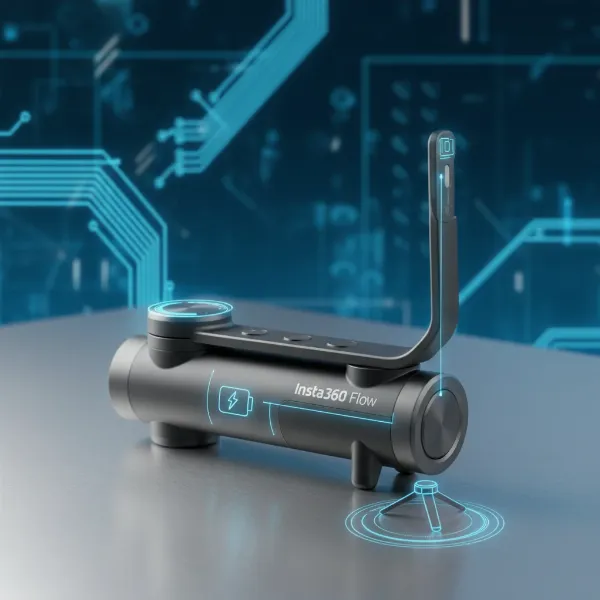
The dolly zoom, often known as the Vertigo effect or Zolly shot, is a powerful cinematic technique that creates a disorienting sensation, making the background appear to stretch or compress while the foreground subject remains constant in size. This captivating visual can evoke intense emotions, from unease and tension to surprise and wonder. Traditionally, executing this shot required expensive camera dollies and precise coordination. However, with the advent of modern camera gimbals, this once-complex effect has become more accessible to filmmakers and videographers of all levels. This guide will walk you through the theory, preparation, and practical steps to master the dolly zoom effect using your gimbal, transforming your footage with professional flair.
Understanding the Dolly Zoom Effect
At its core, the dolly zoom is an optical illusion that plays with perspective. It involves moving the camera either forward or backward (the “dolly” part) while simultaneously zooming the lens in the opposite direction (the “zoom” part). The magic lies in meticulously matching these two movements so that your main subject stays perfectly still within the frame, while the background dramatically shifts. This unique interplay of movement and focal length distorts perspective, either making the background appear to recede rapidly, isolating the subject, or rush forward, creating a sense of claustrophobia or heightened tension.
First pioneered by legendary director Alfred Hitchcock in his 1958 film “Vertigo,” the effect has since been employed in countless movies, from “Jaws” to “Lord of the Rings,” to convey a wide spectrum of emotional states. It’s an invaluable tool for visual storytelling, capable of compressing or extending perceived distances, signaling a shift in character perception, or simply adding a striking visual dynamic to your narrative.
The Gimbal’s Role in Mastering the Dolly Zoom
Historically, achieving a smooth dolly shot required a physical dolly and tracks, often a costly and cumbersome setup. This is where gimbals revolutionize the process. A gimbal is a motorized stabilizer that keeps your camera incredibly steady, neutralizing shakes and vibrations from handheld movement. When combined with the precise control a gimbal offers, you can mimic the fluid motion of a traditional dolly without the need for extensive equipment.
Modern gimbals, especially those designed for smartphones or smaller mirrorless cameras, often come equipped with intelligent features that further simplify the dolly zoom. For instance, devices like the DJI OM4 or Zhiyun Smooth 4 may include dedicated “Dyna-Zoom” or “Vertigo” modes. These smart features automate the zoom and even guide your physical movement, making the synchronization of dolly and zoom much more manageable, even for beginners. With a gimbal, the barrier to entry for this sophisticated cinematic technique is significantly lowered, allowing you to achieve professional-looking results with greater ease and flexibility.
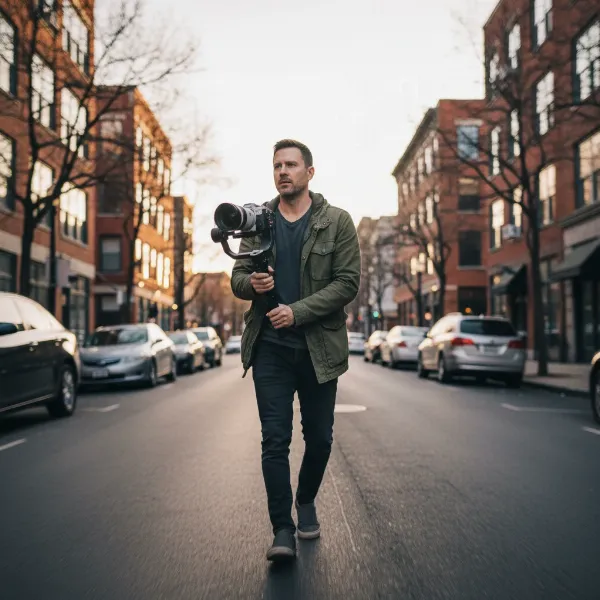 Filmmaker uses gimbal for dolly zoom shot, maintaining subject focus with background distortion.
Step-by-Step Guide to Executing a Dolly Zoom with a Gimbal
Achieving a perfect dolly zoom requires careful planning and execution. Follow these steps to set yourself up for success.
Preparation is Key
Before you even hit record, some foundational steps will ensure your dolly zoom looks its best.
- Choosing your Subject and Location: Select a clear subject that will remain static in your shot. The effect is most pronounced when there’s a significant distance between your subject and the background. A busy background with distinct elements works best, allowing the audience to clearly perceive the perspective distortion. Avoid flat, featureless walls.
- Essential Gear: You’ll need a camera with a zoom lens (preferably a par-focal lens, though not strictly required) and, of course, a well-balanced gimbal. If you’re using a smartphone, ensure it has optical or digital zoom capabilities and is mounted securely on a compatible gimbal.
- Gimbal Setup and Balancing: Properly balance your camera on the gimbal. An unbalanced gimbal will struggle to stabilize, leading to shaky footage and making the dolly zoom impossible. Refer to your gimbal’s manual for precise balancing instructions.
|
Our Picks for the Best Washing Machine in 2026
As an Amazon Associate I earn from qualifying purchases.
|
||
| Num | Product | Action |
|---|---|---|
| 1 | Waterjoy Portable Washing Machines, 7.7 lbs Load Capacity Portable Washer and Dryer Combo with Built-in Barrel Light & LED Display for Household and Apartment (Blue) |

|
| 2 | COSTWAY Portable Washing Machine, Twin Tub 26lbs Capacity Laundry Washer, 18lbs Washer and 8lbs Spinner Combo with Timer Knobs, Built-in Drain Pump, Compact Washer for Home Dorm Apartment, Blue+White |
|
| 3 | Giantex Portable Washing Machine, 17.6lbs Compact Washer Spinner Combo with Pump Drain, Twin Tub 11lbs Wash & 6.6lbs Spin, Lavadoras Portatiles for Apartment RV Dorm College (White & Blue) |
|
| 4 | COSTWAY Portable Washing Machine, Twin Tub 26lbs Capacity Laundry, 18lbs Washer and 8lbs Spinner Combo with Timer Knobs, Built-in Drain Pump, Compact Washer for Home Dorm Apartment (Grey+White) |
|
| 5 | Giantex Portable Washing Machine, 21lbs Capacity, 14.4lbs Washer and 6.6Llbs Spinner, Compact for Apartment RV, White & Gray, GT-GE-10390US-GR-FP |
|
| 6 | Giantex Portable Washing Machine, 20lbs Capacity, Twin Tub 2lbs Washer & 8lbs Spinner Combo, Compact for Apartment RV Dorms, Blue & White, GT24267-PE |
|
| 7 | Portable Washing Machine,16L Upgraded Large Capacity Portable Washer With 3 Modes Deep Cleaning.Suitable For Travel, Camping,Apartments, Dormitories, Hotels (Green) |
|
| 8 | Avanti Portable Compact Washing Machine for Clothes/Laundry, 0.84 Cu. Ft. Capacity, Standard Sink/Faucet Attachment for Apartment, Dorm, RV, White |
|
| 9 | Portable Washing Machine - Compact 2.0 Cu.ft Portable Washer, Full-Automatic Top Loader for Space Saving, Ideal for Apartments, Homes, and Dorms, 10 Wash Cycles, Low Noise, IPX4 with Drain Pump |
|
| 10 | COSTWAY Portable Washing Machine, Twin Tub 26 Lbs Capacity, 18 Lbs Washer and 8 Lbs Spinner, Compact Washer with Control Knobs, Timer Function, Drain Pump, Laundry washer for Apartment RV, Blue |
|
In-Camera Dolly Zoom (Manual Technique)
This method provides the most authentic dolly zoom effect and requires precise manual coordination between movement and zoom.
- Framing Your Shot: Begin by positioning your camera at the desired starting point. Frame your subject in the center of your shot.
- Executing the Movement and Zoom Simultaneously: The core of the dolly zoom is moving the camera while adjusting the zoom in the opposite direction.
- Method A (Dolly Out / Zoom In): Start with your camera relatively close to the subject and zoomed out (wide angle). As you smoothly walk backward (dollying out), simultaneously zoom the lens in.
- Method B (Dolly In / Zoom Out): Alternatively, start further away from your subject and zoomed in (telephoto). As you smoothly walk forward (dollying in), simultaneously zoom the lens out.
- The Importance of Consistent Subject Size: The critical factor is to maintain the subject’s size in the frame throughout the entire movement. This requires continuous micro-adjustments to both your physical distance and your zoom level. It often takes practice to get this synchronization just right.
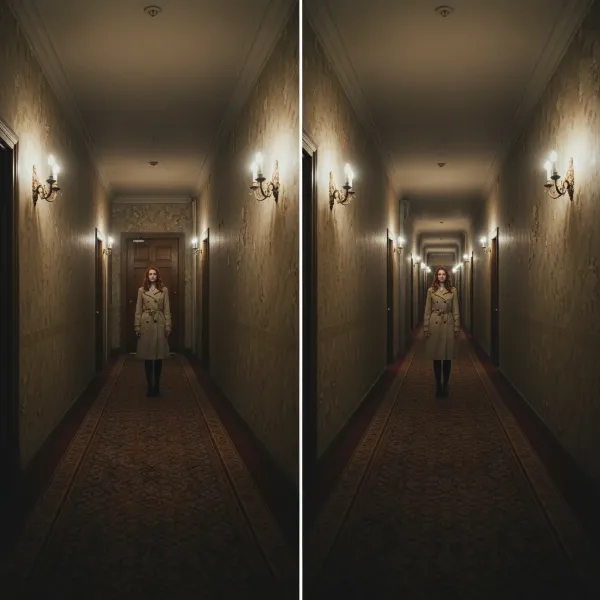 Visual representation of dolly zoom, subject static, background warping dramatically for cinematic effect.
Utilizing Gimbal’s Smart Features (for Smartphones/Compatible Cameras)
Many modern gimbals for smartphones simplify the dolly zoom with automated features.
- Activating “Vertigo” or “Dyna-Zoom” Modes: If your gimbal has a dedicated smart mode for the dolly zoom (often called “Vertigo,” “Dyna-Zoom,” or similar), activate it through the gimbal’s companion app.
- Following On-Screen Prompts: The app will typically guide you through the process, prompting you to select your subject and indicating when to start moving.
- Walking Direction: Once the mode is active, simply walk smoothly towards or away from your subject as instructed. The gimbal and phone app will handle the synchronized zooming, making the process much more intuitive.
Advanced Tips for Perfecting Your Dolly Zoom
With the basics down, these tips will help you elevate your dolly zoom shots from good to truly cinematic.
Achieving Ultra-Smooth Movement
Smoothness is paramount for a convincing dolly zoom. Any jerks or stutters will break the illusion.
- “Ninja Walking” Techniques: Adopt a low, controlled walk. Bend your knees, keeping them slightly springy to absorb shocks. Keep your elbows tucked in and close to your body, acting as natural shock absorbers. This technique, often called “ninja walking,” helps minimize vertical and horizontal vibrations.
- Relaxed Grip: Hold the gimbal firmly but not rigidly. A tense grip can transfer micro-vibrations from your body directly to the camera. Allow your arms to act as a buffer.
Optimizing Scene Composition
The environment plays a huge role in the impact of the dolly zoom.
- Using Foreground and Background Elements: Ensure there are clear objects or distinct patterns in both the foreground (near your subject) and background. These elements will magnify the perspective distortion, making the effect far more dramatic and noticeable. A flat, empty background will significantly diminish the illusion.
- Leading Lines and Depth: Utilize natural leading lines or architectural elements to enhance the sense of depth and movement as the background shifts.
Mastering Timing and Speed
Experimentation with timing can yield vastly different emotional responses.
- Experiment with Pacing: The speed at which you dolly and zoom will affect the intensity of the shot. A slower, more deliberate movement can build suspense, while a rapid one can induce shock or panic. Practice varying your speed to see what works best for your narrative.
- Consistent Speed: Regardless of the chosen pace, maintain a consistent speed for both your movement and zoom throughout the shot to ensure a smooth and professional result.
Post-Production Enhancement (The “Fake” Dolly Zoom)
Even without a zoom lens, you can simulate a dolly zoom in post-production, especially with 4K footage.
- Shooting 4K Footage Without Zoom: Record steady footage of your subject while moving towards or away, ensuring your camera is set to record in 4K resolution. Do not zoom during filming.
- Using Editing Software: In your editing software (e.g., VN, Adobe After Effects, DaVinci Resolve), import your 4K clip. Use keyframes to scale the footage in or out over time. As you scale, manually adjust the position of the clip to keep your subject centered and consistent in size. The extra resolution of 4K allows you to crop and zoom digitally without significant loss of quality.
- Adding Motion Blur: To further enhance the realism of the background distortion, you can apply a subtle amount of motion blur to the background in post-production.
Common Challenges and Troubleshooting
The dolly zoom is a nuanced technique, and you’re bound to encounter some challenges. Here’s how to address them.
- Maintaining Subject Size: This is arguably the most difficult aspect. If your subject appears to grow or shrink, your dolly and zoom speeds are not perfectly synchronized. Practice slow, deliberate movements, focusing intensely on your subject’s size in the frame. Using a camera with focus peaking can help you maintain sharp focus on your subject.
- Eliminating Jitters and Shakes: If your footage is still shaky despite using a gimbal, re-check your gimbal’s balance. Ensure your physical movement is smooth and that you’re not gripping the gimbal too tightly. “Ninja walking” is crucial here. If using a smartphone, ensure it’s securely clamped and balanced.
- Synchronizing Movement and Zoom: This requires muscle memory. Start by practicing each movement independently – first, smooth dollying, then smooth zooming. Once comfortable, try combining them at a very slow pace. It’s often helpful to have distinct start and end points for both your physical movement and your zoom.
- Dealing with Limited Zoom Lenses: If your camera has a very limited zoom range or a fixed prime lens, the in-camera dolly zoom might be difficult or impossible. In such cases, the post-production “fake” dolly zoom becomes your best alternative, provided you shoot in high resolution like 4K.
Conclusion
The dolly zoom effect is a captivating cinematic tool that can add a profound layer of emotional depth and visual storytelling to your videos. While traditionally complex, the accessibility offered by modern camera gimbals has opened up this powerful technique to a wider audience. By understanding the core principles of inverse movement and zoom, practicing smooth “ninja walking” techniques, and leveraging your gimbal’s stabilization or smart features, you can achieve stunning, professional-grade results. Experiment with different subjects, locations, and pacing to discover the unique ways the dolly zoom can enhance your creative vision. Don’t be discouraged by initial attempts; mastery comes with practice and a keen eye for detail. So grab your gimbal, find your subject, and start creating that unforgettable Vertigo effect!
What innovative ways will you use the dolly zoom to tell your next story?
Frequently Asked Questions
What is the difference between a dolly zoom and a regular zoom?
A regular zoom changes the focal length of the lens without moving the camera, making the subject appear closer or further, but maintains the background’s perspective. A dolly zoom, however, combines camera movement with simultaneous opposite zooming, keeping the subject’s size constant while distorting the background’s perspective, creating a unique disorienting effect.
Can I do a dolly zoom without a zoom lens?
An authentic in-camera dolly zoom technically requires a zoom lens. However, you can create a “fake” dolly zoom effect in post-production. By shooting in high resolution (like 4K) while moving the camera and then digitally scaling the footage in editing software, you can simulate the perspective distortion.
Is a gimbal necessary for a dolly zoom?
While not strictly “necessary” if you have a traditional camera dolly and tracks, a gimbal is highly recommended for achieving a smooth, professional-looking dolly zoom without expensive equipment. It stabilizes your camera during handheld movement, making the combined dolly and zoom motion much more fluid and controlled.
How can I make my dolly zoom smoother?
To achieve a smoother dolly zoom, focus on your physical movement by employing “ninja walking” techniques (bent knees, locked elbows) and maintaining a loose, steady grip on your gimbal. Practice synchronizing your physical movement with your lens’s zoom speed, aiming for consistent motion throughout the shot.
What cinematic effects does a dolly zoom create?
The dolly zoom is primarily used to create a sense of unease, tension, fear, or disorientation by distorting spatial perception. It can also visually convey a character’s psychological state, show a sudden realization, or emphasize the vastness or confinement of an environment.